cat projects/snapkeep.md

SnapKeep
Android app · APK to download2024 – 2026
SnapKeep — Keep the statuses you love, in one tap.
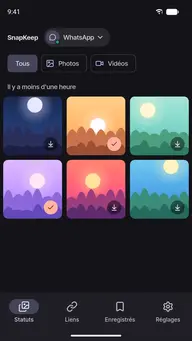
SnapKeep shows the statuses you have viewed in your messaging apps, grouped by period and filterable by photos or videos. One tap copies them to the phone; the Saved tab lists and sorts them and lets you share or repost them. Everything stays on the device.
arm64-v8a · most phones
- Messaging apps supported
- 2Messaging apps supported
- Languages
- 2Languages
- APKs per release, one per architecture
- 3APKs per release, one per architecture
- Data collected
- 0Data collected
cat why.md
Why SnapKeep?
It all starts with situations everyone has been through:
#01
Sharing is turned off
Your contact does not allow their statuses to be shared: WhatsApp offers no way to forward or save them.
#02
Asking does not always work
You have to dare ask for the photo or video, then wait for a reply that may never come. And after 24 hours, the status is gone.
#03
A TikTok video that is locked
The creator turned downloads off: the Save button is gone from TikTok and the video stays stuck in the app.
#04
A Reel to keep
Instagram and Facebook have no button to save a Reel to the phone, and YouTube keeps its videos inside its app.
SnapKeep sorts all of that: Keep the statuses you love, in one tap.
ls ./features
What SnapKeep does
Save in one tap
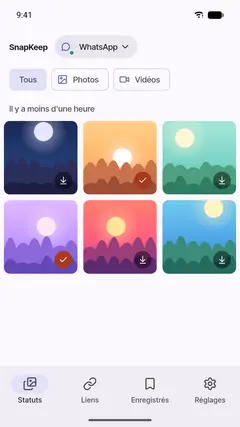
Open SnapKeep after watching statuses: they are all there. One tap copies the photo or video to the phone, a check mark shows what is already kept.
Two messaging apps, one app
WhatsApp and WhatsApp Business in one place, switch between them in one gesture.
Neatly organized
Statuses grouped by time, photo and video filters, a Saved tab and multi-select to save, share or delete.
A pleasant viewer
Swipe through, pinch to zoom, share, or swipe down to close.
Built for every screen
Phone, tablet, foldable or Chromebook: the layout adapts, keyboard and mouse included. Light or dark theme, six palettes.
Private by design
No data collected, no ads, no account: everything stays on the device.
ls ./screenshots
SnapKeep in pictures
1 / 6
ls ./downloads
Download SnapKeep
- arm64-v8amost phones64 MB
- armeabi-v7aolder or entry-level phones57 MB
- x86_64emulators, Chromebooks67 MB
An Android app installed outside the Play Store: the phone asks you to allow installs from the browser the first time. Not sure? Take arm64-v8a.
cd ./behind-the-scenes
Under the hood
How the product is built: the starting problem, the choices made and where it stands.
Challenge
Short-lived statuses stored in hidden Android folders, storage access that has grown more restricted since Android 11, and screens ranging from small phones to foldable tablets.
Solution
A Flutter app that reads each messaging app's folders directly, copies media into Snapkeep/<app>, and adapts its navigation to the screen size: bottom bar, rail or permanent drawer with the viewer beside the grid.
Result
Four versions released (v1.0.0 to v1.1.2), with signed APKs built automatically on every merge into the main branch.
cat decisions.md
01One messaging app, one declaration
Context — More messaging apps may follow WhatsApp and WhatsApp Business.
Why — Each source is a MediaSource entry (folder read, save folder, package): adding one touches no screen.
02All-files access rather than the Play Store
Context — Since Android 11, the Android/media folders can only be read with the all-files permission, which Google Play refuses for this kind of app.
Why — The app keeps that permission and ships as APKs, downloadable from this page; moving to the Storage Access Framework is planned for a Play Store release.
03Releases published by CI
Context — Releasing by hand means forgetting a signature or an architecture.
Why — On every merge into main, if the version has no tag yet, GitHub Actions builds and signs the APKs and the AAB, creates the release, then uploads to Google Play and TestFlight when they are enabled.
04A single extractor for links (in progress)
Context — Every video platform changes its format often.
Why — Rather than relying on platform-specific modules, the integrated engine automatically follows links, identifies the available audio and video streams, and merges them. WorkManager ensures downloads continue in the background, even when the app is closed.
cat description.md
A viewer with zoom and swipe, multi-select to save, share or delete, support for foldables, mouse and keyboard, light or dark theme, six palettes or wallpaper colours (Android 12+), and an interface in French and English.
Link-based downloads rely on an integrated engine, with FFmpeg handling audio and video processing and merging. WorkManager manages background downloads, allowing them to continue even when the app is closed. The maximum supported resolution is 1080p, and the engine updates automatically once a day to maintain compatibility with platform changes.
cat stack.json
Role — Flutter mobile developer
Period — 2024 – 2026
Status — Android app · APK to download
Zone — Togo
./contact.sh
Got a similar project in mind?
Let's talk about your architecture or development needs.
30-minute call, no commitment · or send a message