cat projects/parlo.md

Parlo
Android app · v0.3.1, in progress2026
Parlo — Your PDFs, notes, books and photos of pages read aloud, even when offline.
Parlo imports a document or a photo, extracts its text (recognised on the phone for images and scanned PDFs), splits it into sentences and reads it with the phone's voices, underlining the current sentence. A dyslexia-friendly font, larger text, high contrast and TalkBack: the app is built to be readable by everyone. It is in progress: version 0.3.1 can be downloaded, and the Play Store release is being prepared.
arm64-v8a · most phones
- Document formats read
- 8Document formats read
- Offline, no account
- 100%Offline, no account
- Automated tests
- ~780Automated tests
- APKs per release, one per architecture
- 3APKs per release, one per architecture
cat why.md
Why Parlo?
It all starts with situations everyone has been through:
#01
Reading is hard or tiring
Dyslexia, failing eyesight or plain end-of-day fatigue: listening to a course, a report or a book takes less effort than reading it.
#02
No network, costly data
Online text-to-speech tools send the text to a server and use mobile data. Parlo reads everything on the phone, even in airplane mode.
#03
Hands and eyes busy
On the bus, walking or cooking: the document plays in the background, screen locked, headphones on.
#04
No account, no cloud
No sign-up, no subscription: your documents stay in the app and are not even included in the phone’s backups.
Parlo sorts all of that: Your PDFs, notes, books and photos of pages read aloud, even when offline.
ls ./features
What Parlo does
All your documents
PDF, Word (DOCX), OpenDocument (ODT), DRM-free EPUB, web pages, Markdown, RTF and TXT. Repeated headers, footers and page numbers are removed, and a sentence split across two pages is joined back together.
Photos and scanned PDFs
The text of a photo, a screenshot or a scanned PDF is recognised on the phone, columns read in order. A PDF can mix text pages and scanned pages; progress is shown page by page.
100% offline
The phone’s own voices, offline voices first: your documents are sent nowhere, no account required.
Follow along
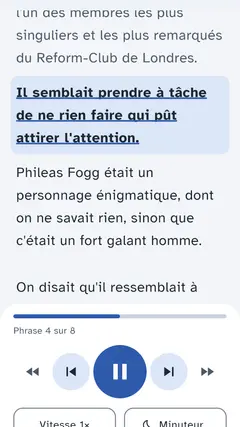
The sentence being read is underlined, those already read turn grey and the page scrolls by itself (“Sentence 212 of 480”). Tap a sentence to read from there.
A voice at your pace
Pick the voice, set the speed from 0.5× to 2× and the pitch, with “Play a sample”. Your settings are kept from one session to the next.
In the background
Reading goes on with the screen locked, pauses during a call then resumes, and stops when the headphones are unplugged. Sleep timer from 5 to 60 minutes, or the end of the paragraph.
Readable for everyone
Atkinson Hyperlegible or OpenDyslexic font, text up to 200%, light, dark or high-contrast colours. Every screen was audited with TalkBack.
Text you can fix
Before listening, the preview shows the text by paragraph: fix or delete a badly recognised passage, the original text is one tap away.
A library you can search
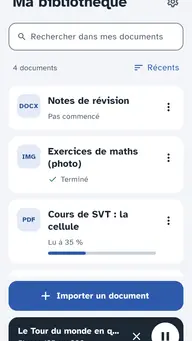
Progress for each document, resume where you left off, sorting, a mini player, and a search through titles and text that ignores accents: a match opens the reader on its sentence.
ls ./screenshots
Parlo in pictures
1 / 8
ls ./downloads
Download Parlo
- arm64-v8amost phones41 MB
- armeabi-v7aolder or entry-level phones33 MB
- x86_64emulators, Chromebooks43 MB
An Android app installed outside the Play Store: the phone asks you to allow installs from the browser the first time. Not sure? Take arm64-v8a.
cd ./behind-the-scenes
Under the hood
How the product is built: the starting problem, the choices made and where it stands.
Challenge
Read very different formats faithfully (laid-out PDFs, zipped XML, RTF, HTML), offline, on entry-level phones, without a booby-trapped file freezing or crashing the app.
Solution
A feature-first clean architecture, enforced by a test, with one extractor per format running in a time- and memory-bounded isolate, a speech engine behind an interface so new voices can plug in, and reading driven by a Bloc wired to the media notification.
Result
Five versions released (v0.1.0 to v0.3.1), with one APK per architecture built by GitHub Actions on every tag, about 1,180 automated tests and an accessibility audit of every screen.
cat decisions.md
01An architecture enforced by a test
Context — Import, extraction, voices and reading evolve separately, and the app will grow (OCR, new voices, settings).
Why — Each feature has its own domain, data and presentation layers; an architecture test fails as soon as a dependency points the wrong way.
02Pausing means stopping, then rereading
Context — The speech engine's pause() is unreliable on Android.
Why — Text is read in chunks of at most 300 characters: pausing stops the voice, resuming rereads the current sentence. The engine sits behind an interface, ready for Piper voices.
03Isolated extraction, with a time limit
Context — A booby-trapped file (ZIP bomb, deeply nested HTML, runaway regular expression) can freeze the screen or exhaust memory.
Why — Each extractor runs in an isolate killed after 60 seconds, with per-format size limits, bounded nesting and fuzz tests on tricky characters.
04Text recognition on the phone
Context — A photo of a page or a scanned PDF has no text, and sending it to an online service would expose personal documents.
Why — ML Kit recognises the text on the device, page by page, with announced progress, a 10-minute limit and a 50-megapixel cap per image; the text and the images never leave the phone.
05No data in backups
Context — The documents read can be personal: courses, contracts, reports.
Why — No cloud backup and no transfer to a new phone (allowBackup off and data extraction rules on Android), checked by a test that reads the manifest.
cat description.md
Already shipped: import of eight formats (up to 50 MB), clean PDF extraction through PDFium, an editable text preview, sentence-by-sentence reading with highlighting, background playback with a media notification and headset controls, pausing during calls, a sleep timer, a mini player, a persistent library with progress, search and sorting, light, dark and high-contrast themes, and an interface in French and English.
Roadmap: share a file to Parlo from another app; read scanned PDFs and photos with OCR (ML Kit); more natural Piper neural voices, downloaded on demand (sherpa-onnx); saved settings, a pause between sentences, a pronunciation dictionary, font size and a dyslexia-friendly font; an accessibility pass and testing on an entry-level phone; then a Play Store release and, later, transcription of voice messages.
Every choice is recorded in a log of about fifty dated decisions, and every step goes through a security audit: booby-trapped ZIP archives, deeply nested XML, huge PDFs, regular expressions with runaway cost. Continuous integration checks code, formatting, analysis and tests against a PDFium library verified by checksum.
cat stack.json
Role — Flutter mobile developer
Period — 2026
Status — Android app · v0.3.1, in progress
Zone — Togo
./contact.sh
Got a similar project in mind?
Let's talk about your architecture or development needs.
30-minute call, no commitment · or send a message